On Thursday, the 3rd of December 2009 SQLUG.BE (The Belgian SQL Server User Group) and Microsoft are teaming up to organize the second Belgian SQL Server Day. Focus of the day is off course SQL Server.
Last year, SQL Server Day 2008 was the biggest community driven SQL Server event in the Benelux, with more than 200 attendees.
The event will kick-off with an international speaker positioning the SQL Server data platform, today and tomorrow.
We have 6 break-out sessions with technical content on SQL Server. The speakers are recognized international SQL Server experts; including Dirk Gubbels, Chris Webb, Henk van der Valk, ...
During the lunch break our gold partners will present their solutions and offerings in the lightning sessions .
We conclude the day with a closing keynote on Gemini, the new breakthrough Self-Service Business Intelligence (BI) capabilities being delivered in SQL Server 2008 R2.
Full details and registration are available on www.sqlserverday.be
Saturday, October 10, 2009

Tuesday, September 15, 2009
Next SQLUG.BE event - Zero-Downtime upgrade from SQL Server 2005
Next week we kick of another year of SQLUG.BE evening sesions.
To be sure we kick-off properly, we hired a top-speaker, namely Dirk Gubbels. Dirk is one of our best guest speakers and by far one of the best SQL Server professionals.
Dirk Gubbels is a senior consultant at Microsoft, and has been working with SQL Server since version 4.2.
As one of the few Microsoft Certified Database Architects he has been involved in the most demanding SQL server based applications in Belgium and all over the EMEA region.
His main focus areas are Design, Performance and Availability for both OLTP and Business Intelligence environments.
Upgrading from SQL Server 2005 to 2008 may look very easy and straightforward, but there are always risks involved.
The goal of this session is to identify these risks, and show proven ways to mitigate these, or reduce the impact.
The second part of the session will show some techniques for minimizing downtime during the upgrade, to a point where the application can remain online.
This session will focus on the upgrade process for the Database engine, not on the differences between the versions, or the upgrade process of other SQL Server components
Agenda:
18:00 Registration
18:30 Session Start
21:00 Session End
Location:
Microsoft BeLux
Corporate Village
Da Vincilaan 3
1935 Zaventem
this event is brought to you by Microsoft
Click here to register.
To be sure we kick-off properly, we hired a top-speaker, namely Dirk Gubbels. Dirk is one of our best guest speakers and by far one of the best SQL Server professionals.
Dirk Gubbels is a senior consultant at Microsoft, and has been working with SQL Server since version 4.2.
As one of the few Microsoft Certified Database Architects he has been involved in the most demanding SQL server based applications in Belgium and all over the EMEA region.
His main focus areas are Design, Performance and Availability for both OLTP and Business Intelligence environments.
Upgrading from SQL Server 2005 to 2008 may look very easy and straightforward, but there are always risks involved.
The goal of this session is to identify these risks, and show proven ways to mitigate these, or reduce the impact.
The second part of the session will show some techniques for minimizing downtime during the upgrade, to a point where the application can remain online.
This session will focus on the upgrade process for the Database engine, not on the differences between the versions, or the upgrade process of other SQL Server components
Agenda:
18:00 Registration
18:30 Session Start
21:00 Session End
Location:
Microsoft BeLux
Corporate Village
Da Vincilaan 3
1935 Zaventem
this event is brought to you by Microsoft
Click here to register.
Wednesday, July 15, 2009
Excel 2010 - a personal sneak preview
For the last couple of years I have been working on quite a few projects where we used Excel 2007 as the number one front-end on top of Analysis Services 2005/2008 cubes. I am a big fan of the killer combination of Excel/Analysis Services. And I am pretty good in convincing (potential) customers of this. Recently, a customer spoke the infamous words :" It is a Revelation", when he saw me slice and dice his data in Excel. I couldn't agree less ;-)
Anyway, although I am a big fan, I must admit that I sometimes reached the boundaries of the pivot table functionality in Excel 2007. Earlier this week Microsoft released the Technology Preview of Office 2010 and Sharepoint Server. I was very eager to find out which topics on my personal feature wish list made it into the product.
In the following weeks I will play around with the bits and focus on the following topics:
- Excel as a front-end on Analysis Services 2005/2008
- Excel interaction with the upcoming fancy stuff in SQL Server 2008 R2 (Gemini, Kilimanjaro)
- Sharepoint Performance Point Services, the successor of PPS Monitoring and Analytics and the web based version of Excel
- Below you can find my *very personal* review after playing around a few hours with the Technology Preview the Excel 2010 fat client.
Below you can find my *very personal* review after playing around a few hours with the Technology Preview Excel 2010 fat client.
Installation
As usual finding the product key is the hardest part;-) Apart from that installation is a snap: next, next, ... finish.
Feedback
The CTP contains a very nice feedback mechanism. When you click the happy or unhappy icon in the taskbar, a input screen pops up where you can write your feedback.
One click of the mouse and your feedback is sent along with a screenshot to Microsoft. This is a lot more convenient that the traditional Connect website.

Show 1 measure multiple times + Show value as ....
You can now drag a measure more than once to the values area, and show the value in different forms.

Even cooler: Year To Date calculations without writing MDX

Filter Dimension members in report filter
Really cool: a big time saver when filtering large dimensions.

Slicers
Slicers are a great new way to filter and compare data for specific dimension members.


I was not able use them on a Analysis Services pivot table. In the screenshot I created a pivot table on an Excel range, but you get the idea.
UPDATE: Slicers didn't work on a SSAS cube because my VPC was running with Belgian (Dutch) regional settings. Switch your regional settings to US English and the slicers do work.
Sparklines
Sparklines are another great visualization. Sparklines are tiny little graphs, the size of a single cell. A great new way to visualize trends!

Sparklines and Slicers are shown in this little webcast
Dynamic Sets
Dynamic sets (eg. Top 25 Selling Products) were a great addition in Analysis Services 2008. Unfortunately Excel 2007 didn't handle them very well. Now they are fully supported :-)

Create custom set from Excel
Named set are really great when doing data analysis. You can now create them from Excel via very nice GUI.


There is even a little GUI which allows you to write MDX. A little code highlighting would have been nice ;-)

Really cool, we can now create sets from Excel. But how about calculated measures or members? Well it looks like this will be added in later CTPs. In the current CTP the menu items (Calculated Field, Calculated Item) are grayed out. Something to look forward to.

Writeback
Analysis Services has had a writeback functionality for quite some time now. This is a great feature for planning and budgeting applications because it allow end-users to validate different what-if scenario's. With Office 2010 this functionality is finally exposed in Excel. A killer feature!


Conclusion
After a few hours fun with Excel 2010, loud and clear: " It is a Revelation". Upgrading from Excel 2003 to Excel 2007 was like going from black and white television to color television. With Excel 2010 we get full HD digital televison on a gigantic plasma TV. I am looking forward to the upcoming CTPs and I hope that all the new stuff will make it in the RTM version.
Wednesday, July 08, 2009
PTPower - review
I recently ran into PTPower . PTPower is a free Excel add-in which fixes 3 topics on my personal Excel/Analysis Services features whislist:
- An easy way find the underlying MDX SELECT statement of an Excel Pivot table
- Smoother development and debugging of calculated members
- Add calculated measures to an pivot table on the fly from Excel
PTPower is exposed as an Excel 2007 Add-In - within the "PivotTable Tools" Ribbon.

Just click the Show MDX button and PTPower will show you a popup window with the underlying MDX statement of the pivot table. The MDX Statement is color highlighted and ready to be copy/pasted in MDX Studio, Report Builder, ... Very simple, but just works :-)
The second feature is even cooler. Developing and debugging calculated measures in BIDS is a bit cumbersome. Most of the time I use the script view in BIDS for that. For every change in the MDX statement you have to deploy the cube (or at least the MDX scipt using BIDS Helper) and switch back and forth to the cube browser or Excel to see the result.
PTPower allows you to build and test your calculations from Excel using a nice GUI. When you click the Calculation button a GUI similar to the calculation tab in BIDS pops up. Write your MDX calculation, click Save, click Close. Excel will refresh your pivot table and you will see the results immediately.

Calculations created via PTPower are implemented as session members. This means they are not saved to cube, but only available in the current session. When you save the Excel file and reopen it, PTPower will recreate the session members.

And this is very cool, because it allows end-user to add their own calculations from Excel. Altough they will need to learn MDX. Which might be a bit challenging for most end-users ;-)
Anyway, PTPower is nice addition to my Analysis Services toolkit. And is tooltje van de week.
Tuesday, April 28, 2009
Enabling Report Builder 2.0 Click Once
Starting from SQL Server 2008 SP1 Report Builder 2.0 can now be deployed as a click-once application. However this is not the default behavior after you install SP1.
If you click the "Report Builder" icon in the Report Manager, the old Report Builder will pop up.
To change this go to the Site Settings and change the URL under "Custom Report Builder launch URL" to following:
http://YourServer/ReportServer/ReportBuilder/ReportBuilder_2_0_0_0.application
This should do the trick. Have fun with Report Builder 2.0
If you click the "Report Builder" icon in the Report Manager, the old Report Builder will pop up.
To change this go to the Site Settings and change the URL under "Custom Report Builder launch URL" to following:
http://YourServer/ReportServer/ReportBuilder/ReportBuilder_2_0_0_0.application
This should do the trick. Have fun with Report Builder 2.0
Wednesday, December 03, 2008
Friday, November 21, 2008
SQL Server Day - Sessions Worldle
We finalized the agenda for SQL Server Day and published the session abstracts earlier this week. I created a worlde based on the session abstracts. Seems like we are gonna talk a lot about SQL Server, 2008, features and Data!!!

If you haven't registered yet, make sure you do so and join the 250+ other registered SQL Server Enthousiasts.
Wednesday, November 19, 2008
DBCC SHRINKFILE can uncompress a compressed table in SQL Server 2008
While preping a demo on data compression for my session for the upcoming SQL Server Day I ran into a funny behaviour of DBCC SHRINKFILE.
In the script below I create a table, fill it with data. The table takes 157 pages.

After compressing it with page compression the table only takes 15 pages. Which is cool.

When I run a DBCC SHRINKFILE the table explotes to a to 116 pages.

I was really confused and tought I hit a bug. But I think I found an explanation. Basically DBCC SHRINKFILE will move used pages at the end of the file to a free spot somewhere else in the data file. The funny thing is that SQL Server is not just moving the pages, but will actually uncompress the pages.
Which leads me to the following conlusion. Although you use ALTER TABLE, INDEX, PARTITION, ... DDL statements to specify compression, compression is not a TABLE, INDEX or PARTITION level property but a page level property.
Or did I hit a bug?
--Use SQL Server Internals Viewer
USE testCompression
GO
ALTER DATABASE testCompression
SET SINGLE_USER WITH ROLLBACK IMMEDIATE
USE MASTER
DROP DATABASE testCompression
GO
CREATE DATABASE testCompression
GO
USE testCompression
CREATE TABLE PageCompressed
(val BIGINT
,st VARCHAR(100)
)
GO
INSERT INTO Pagecompressed
(val, st) SELECT RAND()*1, REPLICATE('A', 100)
GO 10000
SELECT page_count, * FROM sys.dm_db_index_physical_stats (
DB_ID (),
OBJECT_ID ('dbo.Pagecompressed'),
NULL, NULL, 'SAMPLED');
GO
-- Turn on compression
ALTER TABLE Pagecompressed REBUILD
WITH (DATA_COMPRESSION = PAGE);
GO
SELECT page_count, * FROM sys.dm_db_index_physical_stats (
DB_ID (),
OBJECT_ID ('dbo.Pagecompressed'),
NULL, NULL, 'SAMPLED');
GO
DBCC SHRINKFILE(testCompression)
go
SELECT page_count, * FROM sys.dm_db_index_physical_stats (
DB_ID (),
OBJECT_ID ('dbo.Pagecompressed'),
NULL, NULL, 'SAMPLED');
GO
Monday, November 17, 2008
BI Dutch - new BI Community in Holland
Johan van der Kooij, Dutch blogger on (MS) Business Intelligence and a long time biTunes fan :-) started a new BI Community in Holland. The blog on bidutch.nl contains quite a few interesting posts in Dutch. You can join the community via the Linked Group on http://www.linkedin.com/e/gis/46641.
Friday, November 14, 2008
Data Mining in the Cloud
I recently ran into this online data mining tool on http://www.
The SQL Server Data Mining team is working to extend the power and ease of use of SQL Server Data Mining to the Cloud. The goal is to provide services that allow you to build rich, predictive applications without worrying about server infrastructure, and showcase these services with cool applications that give you a glimpse of what’s possible. The guys released a first version, which is available for free online.
If you wanna get started with data mining without going through the installation hassle, this is a really great online tool. The cool thing is that you can even upload your own set of data in a CSV file.
Talking about data mining. On December the 4th, Marc and Dennis from IKAN Consulting will give a session on data mining on SQL Server Day. If you haven’t registered for SQL Server Day, make sure to do so on www.sqlserverday.be.
Tuesday, October 21, 2008

Monday, September 29, 2008
Belgian SQL Server Day - Call for speakers
On Thursday, the 4th of December 2008 SQLUG.BE (The Belgian SQL Server User Group) and Microsoft are teaming up to organize the first Belgian SQL Server Day. Focus of the day is off course SQL Server 2008.
The event will be the biggest community driven SQL Server event in Belgium with an estimate of 200+ attendees eager to learn, get answers to their questions and also important socialize.
For this event we are still look for speakers. We are looking for sessions that cover new features and improvements in SQL Server 2008 (Database Administration, Development, Business Intelligence, ...). Sessions are 60 minutes.
If you are interested in speaking on the event, please send an e-mail to frederik@sqlug.be with a session title and abstract.
The website sqlserverday.be will be launched in the coming days.
Looking forward to hear from you.
The event will be the biggest community driven SQL Server event in Belgium with an estimate of 200+ attendees eager to learn, get answers to their questions and also important socialize.
For this event we are still look for speakers. We are looking for sessions that cover new features and improvements in SQL Server 2008 (Database Administration, Development, Business Intelligence, ...). Sessions are 60 minutes.
If you are interested in speaking on the event, please send an e-mail to frederik@sqlug.be with a session title and abstract.
The website sqlserverday.be will be launched in the coming days.
Looking forward to hear from you.
Monday, September 01, 2008
Next SQLUG.BE session on SSIS
We announced our next SQLUG.BE event on Integration Services. We will have 2 sessions by 2 top speakers. Looking forward to see you there.
Session 1: what's new in SSIS 2008 by Nico Verheire
A word about our speaker:
Nico Verheire is a Business Intelligence Consultant for RealDolmen. For the last 4 years, he has been working almost exclusively on SQL Server (7, 2000, 2005), with a strong focus on SSIS, SSAS and SSRS. Nico currently holds an MCTS certification for SQL Server 2005 BI.
Abstract:
Level: 200
Session 2: Deep-dive session about improving SSIS performance given by Geert Vanhove
A word about our speaker:
Geert Vanhove started his career in IT in 1991 as COBOL programmer on a mainframe system. In 1994 he chose to focus on databases, first on Sybase, later (1998) -almost- fulltime on Microsoft SQL Server. In 2005 he started his own company - DCOD - mainly focussing on performance tuning of SQL Server OLTP and BI platforms. He was closely involved with some of the most important SQL Server realizations in Belgium - as well in a development as in an operational context.
Abstract:
This session will address some problems that might occur when a SSIS solution needs to scale because DB and data volumes to load are getting larger. This session is not only a statement of how you can improve your SSIS performance; the impact of each optimization step is shown in action throughout the demo package that will be the red wire of this presentation...
Level: 300
Date: Thu September 25, 2008
Agenda:
18:00 - 18:30 Welcome with a drink & sandwich
18:30 - 20:00 Part 1
20:00 - 20:30 Pause
20:30 - 22:00 Part 2
22:00 - ... networking
Location:
The event-sponsor is Kohera in Kontich:
Veldkant 33a
2550 Kontich
A route description can be downloaded here.
Registration is needed and is open.
Registration will be closed on September 23
Wednesday, August 06, 2008
SQL Server 2008 is RTM
Big news today. SQL Server 2008 is now available to MSDN and TechNet subscribers and will be available for evaluation download on Aug. 7, 2008.
SQL Server 2008 is available in 7 editions:
| • | SQL Server 2008 Enterprise. SQL Server 2008 Enterprise is a comprehensive data management and business intelligence platform that provides enterprise-class scalability, data warehousing, security, advanced analytics and reporting support for running business-critical applications. With this edition, it is possible to consolidate servers and perform large-scale online transactional processing. |
| • | SQL Server 2008 Standard. SQL Server 2008 Standard is a complete data management and business intelligence platform that provides best-in-class ease of use and manageability for running departmental applications. |
| • | SQL Server 2008 Workgroup. SQL Server 2008 Workgroup is a reliable data management and reporting platform that delivers secure, remote synchronization and management capabilities for running branch applications. This edition includes core database features and is easy to upgrade to the Standard or Enterprise edition. |
| • | SQL Server 2008 Web. SQL Server 2008 Web is designed for highly available, Internet-facing Web-serving environments running on Windows Server. SQL Server 2008 Web provides the tools necessary to support low-cost, large-scale, highly available Web applications or hosting solutions for customers. |
| • | SQL Server 2008 Developer. SQL Server 2008 Developer allows developers to build and test any type of application with SQL Server. This edition features all of the functionality of SQL Server Enterprise but is licensed only for development, test and demo use. Applications and databases developed on this edition can easily be upgraded to SQL Server 2008 Enterprise. |
| • | SQL Server 2008 Express. SQL Server 2008 Express is a free edition of SQL Server that features core database functionality including all of the new SQL Server 2008 data types, in a small footprint. This edition is ideal for learning and building desktop and small server applications, and for redistribution by ISVs. |
| • | SQL Server Compact 3.5. SQL Server Compact is a free embedded database designed for developers and is ideal for building stand-alone and occasionally connected applications for mobile devices, desktops and Web clients. SQL Server Compact runs on all Microsoft Windows platforms, including the Windows XP and Windows Vista operating systems, and on Pocket PC and smartphone devices. |
SQL Server 2008 Express and SQL Server Compact editions are available for free download today at http://www.microsoft.com/sqlserver.
Read the press release on: http://www.microsoft.com/Presspass/press/2008/aug08/08-06SQLServer2008PR.mspx
More information is available at http://www.microsoft.com/presspass/presskits/sqlserver.
Wednesday, July 09, 2008
The connection in this workbook will no longer be identical to the connection defined in the external file located at ...
Office Data Connection files (ODC files) are a great feature in Excel 2007. Basically this technology allows you to store connection information (server name, authentication, database name, cube, ...) in a file. This file can be placed on a central file share or in a Sharepoint library. In stead of defining new connection info in every single Excel file, you just point to the "central" ODC file. If something changes, e.g. the cube is moved to another server, you simple update the ODC file and everyone is redirected the new server automatically.
At least this wil work if you specied "Always attempt to use this file to refresh data" the during the initial creation of the ODC file.
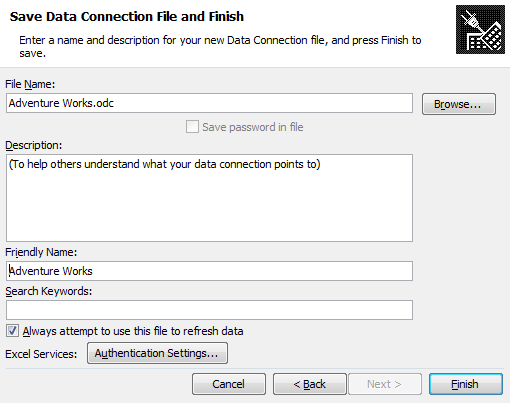
If you didn't check the check box then you and want to enforce the link afterwards you might be tempted to check the "Always use connection file" checkpoint in the connection properties (Click Connections in Data ribbon, Properties, Definition)
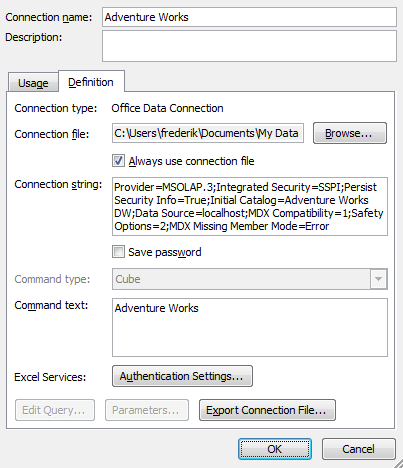
However if you check "Always use the connection file" you will get following error message:
The connection in this workbook will no longer be identical to the connection defined in the external file located at ....
The link to that external file will also be removed.
Do you want to proceed with the changes to the connection in this workbook?
Excel will break the link between the "Excel internal" connection and the ODC file. The UI seems to suggest that you can fix the link. At least that's what I thought. The key point is that the option "Always use the connection file" is not stored in Excel but in the ODC file.
If you want to fix the link between Excel and the ODC file you can manually update the ODC file by adding the following line
<odc:AlwaysUseConnectionFile/>
Make sure to add it just before the </odc:Connection> line.

After you saved the ODC file go back to Excel. Click Connections in the Data ribbon, Properties, Definition. Click Browse and point to the updated ODC file. After you click OK you will notice that the "Always use connection file" checkbox is now checked. And you no longer receive the error message.
Took me quite some time recently to find out, so I wanted to share this one.
Friday, July 04, 2008
SQL Server 2008 Jumpstart material available to public
In february I attended the SQL Server 2008 Jumpstart training in Seattle. The trainings were written and presented by SQL Server gurus (Kimberly Tripp, Paul Randal, Bob Beauchemin ,...). All sessions were recorded and are now available for download (free registration required).
On the site you will find:
- All session recordings
- Powerpoints
- Demo and Sample Scripts
- VPCs
- SQL Server 2008 funny video's
A must have if you wanna get a jumpstart with SQL Server 2008!
SQL Server 2008 Top 10 Features
Last week I presented my personal top 10 of new Features in SQL Server 2008 on the Community Day.
Here's the list
Werner Geuens gave an excellent presentation on the new datatypes in SQL Server 2008. This is also available on Chopsticks.
The Community Day was again a big success. Looking forward to next year!!!
Here's the list
- Backup Compression
- PowerShell
- Policy Based Mgmt
- Multi Server Mgmt
- Resource Governor
- Change Data Capture
- Data Profiling
- AS DMVs
- Report Builder 2.0
- New stuff in SQL Server Management Studio (RC0)
Werner Geuens gave an excellent presentation on the new datatypes in SQL Server 2008. This is also available on Chopsticks.
The Community Day was again a big success. Looking forward to next year!!!
SQL Server 2008 MCTS beta exams open for public
Microsoft extended the beta period for the first set of SQL Server 2008 exams. The beta exams are now open to the public. Passing the beta exams will make you a MCTS on SQL Server 2008.
These exams will be available until July 31, 2008.
71-432 - Promo code 943F6
You are invited to take beta exam 71-432: TS: Microsoft SQL Server 2008, Implementation and Maintenance. You were specifically chosen to participate in this beta because of your current Microsoft Certification status or previous participation with Microsoft Learning. If you pass the beta exam, the exam credit will be added to your transcript and you will not need to take the exam in its released form. The 71-xxx identifier is used for registering for beta versions of MCP exams, when the exam is released in its final form the 70-xxx identifier is used for registration.
By participating in beta exams, you have the opportunity to provide the Microsoft Certification program with feedback about exam content, which is integral to development of exams in their released version. We depend on the contributions of experienced IT professionals and developers as we continually improve exam content and maintain the value of Microsoft certifications.
71-432: TS: Microsoft SQL Server 2008, Implementation and Maintenance counts as credit towards the following certification(s).
· Microsoft Certified Technology Specialist: SQL Server 2008, Implementation and Maintenance
Availability
Registration begins: June 5, 2008
Beta exam period runs: June 9, 2008– July 31, 2008
Receiving this invitation does not guarantee you a seat in the beta; we recommend that you register immediately. Beta exams have limited availability and are operated under a first-come-first-served basis. Once all beta slots are filled, no additional seats will be offered.
Testing is held at Prometric testing centers worldwide, although this exam may not be available in all countries (see Regional Restrictions). All testing centers will have the capability to offer this exam in its live version.
Regional Restrictions: India, Pakistan, China
71-448 - Promo code B6543
You are invited to take beta exam 71-448: TS: Microsoft SQL Server 2008, Business Intelligence Development and Maintenance. You were specifically chosen to participate in this beta because of your current Microsoft Certification status or previous participation with Microsoft Learning. If you pass the beta exam, the exam credit will be added to your transcript and you will not need to take the exam in its released form. The 71-xxx identifier is used for registering for beta versions of MCP exams, when the exam is released in its final form the 70-xxx identifier is used for registration.
By participating in beta exams, you have the opportunity to provide the Microsoft Certification program with feedback about exam content, which is integral to development of exams in their released version. We depend on the contributions of experienced IT professionals and developers as we continually improve exam content and maintain the value of Microsoft certifications.
71-448: TS: Microsoft SQL Server 2008, Business Intelligence Development and Maintenance counts as credit towards the following certification(s).
· Microsoft Certified Technology Specialist: SQL Server 2008, Business Intelligence Development and Maintenance
Availability
Registration begins: June 15, 2008
Beta exam period runs: June 16, 2008– July 31, 2008
Receiving this invitation does not guarantee you a seat in the beta; we recommend that you register immediately. Beta exams have limited availability and are operated under a first-come-first-served basis. Once all beta slots are filled, no additional seats will be offered.
Testing is held at Prometric testing centers worldwide, although this exam may not be available in all countries (see Regional Restrictions). All testing centers will have the capability to offer this exam in its live version.
Regional Restrictions: India, Pakistan, China
You must register at least 24 hours prior to taking the exam.
Please use the following promotional code when registering for the exam: 943F6
Receiving this invitation does not guarantee you a seat in the beta; we recommend that you register immediately.
To register in North America, please call:
•Prometric: (800) 755-EXAM (800-755-3926)
Outside the U.S./Canada, please contact:
•Prometric: http://www.register.prometric.com/ClientInformation.asp
Test Information and Support
You are invited to take this beta exam at no charge.
You will be given four hours to complete the beta exam. Please plan accordingly.
Find exam preparation information: http://www.microsoft.com/learning/exams/70-432.mspx
For Microsoft Certified Professional (MCP) help and information, you may log in to the MCP Web site at http://www.microsoft.com/learning/mcp/or contact your Regional Service Center: http://www.microsoft.com/learning/support/worldsites.asp.
•Where can I learn more about the registration process?
•Where can I learn more about the beta exam invitation process?
•Where can I learn more about the new structure of Microsoft Certification?
•Who do I contact for help with this beta exam or other MCP questions?
Saturday, June 07, 2008
SQL Server 2008 RC0 released
SQL Server Release Candidate 0 is now available for public download on the Connect site.
Subscribe to:
Posts (Atom)