Twitter Updates

    follow me on Twitter

    Wednesday, July 09, 2008

    The connection in this workbook will no longer be identical to the connection defined in the external file located at ...

    Office Data Connection files (ODC files) are a great feature in Excel 2007. Basically this technology allows you to store connection information (server name, authentication, database name, cube, ...) in a file. This file can be placed on a central file share or in a Sharepoint library. In stead of defining new connection info in every single Excel file, you just point to the "central" ODC file. If something changes, e.g. the cube is moved to another server, you simple update the ODC file and everyone is redirected the new server automatically.

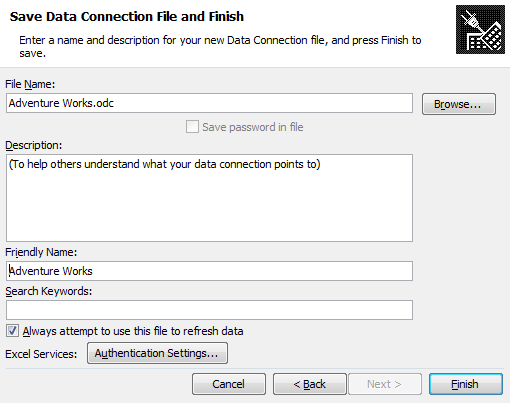
    At least this wil work if you specied "Always attempt to use this file to refresh data" the during the initial creation of the ODC file.

    image

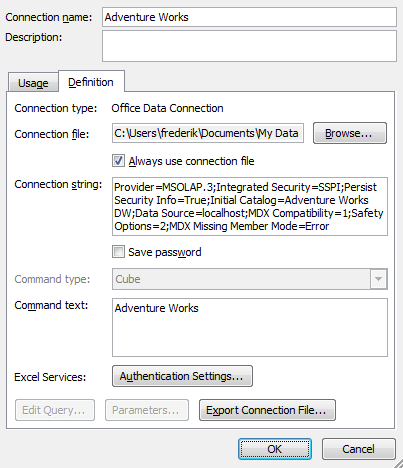
    If you didn't check the check box then you and want to enforce the link afterwards you might be tempted to check the "Always use connection file" checkpoint in the connection properties (Click Connections in Data ribbon, Properties, Definition)

    image

    However if you check "Always use the connection file" you will get following error message:

    The connection in this workbook will no longer be identical to the connection defined in the external file located at ....
    The link to that external file will also be removed.
    Do you want to proceed with the changes to the connection in this workbook?

    Excel will break the link between the "Excel internal" connection and the ODC file. The UI seems to suggest that you can fix the link. At least that's what I thought. The key point is that the option "Always use the connection file" is not stored in Excel but in the ODC file.

    If you want to fix the link between Excel and the ODC file you can manually update the ODC file by adding the following line


    <odc:AlwaysUseConnectionFile/>

    Make sure to add it just before the </odc:Connection> line.

    image

    After you saved the ODC file go back to Excel. Click Connections in the Data ribbon, Properties, Definition. Click Browse and point to the updated ODC file. After you click OK you will notice that the "Always use connection file" checkbox is now checked. And you no longer receive the error message.

    Took me quite some time recently to find out, so I wanted to share this one.

    Friday, July 04, 2008

    SQL Server 2008 Jumpstart material available to public

    In february I attended the SQL Server 2008 Jumpstart training in Seattle. The trainings were written and presented by SQL Server gurus (Kimberly Tripp, Paul Randal, Bob Beauchemin ,...). All sessions were recorded and are now available for download (free registration required).


    On the site you will find:
    • All session recordings
    • Powerpoints
    • Demo and Sample Scripts
    • VPCs
    • SQL Server 2008 funny video's

    http://sqlserver2008jumpstart.microsofttraining.com/content/DownloadMaterial.asp?CcpSubsiteID=69&section=Overview


    A must have if you wanna get a jumpstart with SQL Server 2008!

    SQL Server 2008 Top 10 Features

    Last week I presented my personal top 10 of new Features in SQL Server 2008 on the Community Day.

    Here's the list
    1. Backup Compression
    2. PowerShell
    3. Policy Based Mgmt
    4. Multi Server Mgmt
    5. Resource Governor
    6. Change Data Capture
    7. Data Profiling
    8. AS DMVs
    9. Report Builder 2.0
    10. New stuff in SQL Server Management Studio (RC0)
    The session was recorded and is now available on Chopsticks.


    Werner Geuens gave an excellent presentation on the new datatypes in SQL Server 2008. This is also available on Chopsticks.


    The Community Day was again a big success. Looking forward to next year!!!

    SQL Server 2008 MCTS beta exams open for public

    Microsoft extended the beta period for the first set of SQL Server 2008 exams. The beta exams are now open to the public. Passing the beta exams will make you a MCTS on SQL Server 2008.

    These exams will be available until July 31, 2008.

    71-432 - Promo code 943F6

    You are invited to take beta exam 71-432: TS: Microsoft SQL Server 2008, Implementation and Maintenance. You were specifically chosen to participate in this beta because of your current Microsoft Certification status or previous participation with Microsoft Learning. If you pass the beta exam, the exam credit will be added to your transcript and you will not need to take the exam in its released form. The 71-xxx identifier is used for registering for beta versions of MCP exams, when the exam is released in its final form the 70-xxx identifier is used for registration.
    By participating in beta exams, you have the opportunity to provide the Microsoft Certification program with feedback about exam content, which is integral to development of exams in their released version. We depend on the contributions of experienced IT professionals and developers as we continually improve exam content and maintain the value of Microsoft certifications.

    71-432: TS: Microsoft SQL Server 2008, Implementation and Maintenance counts as credit towards the following certification(s).

    · Microsoft Certified Technology Specialist: SQL Server 2008, Implementation and Maintenance


    Availability

    Registration begins: June 5, 2008

    Beta exam period runs: June 9, 2008– July 31, 2008

    Receiving this invitation does not guarantee you a seat in the beta; we recommend that you register immediately. Beta exams have limited availability and are operated under a first-come-first-served basis. Once all beta slots are filled, no additional seats will be offered.

    Testing is held at Prometric testing centers worldwide, although this exam may not be available in all countries (see Regional Restrictions). All testing centers will have the capability to offer this exam in its live version.

    Regional Restrictions: India, Pakistan, China


    71-448 - Promo code B6543

    You are invited to take beta exam 71-448: TS: Microsoft SQL Server 2008, Business Intelligence Development and Maintenance. You were specifically chosen to participate in this beta because of your current Microsoft Certification status or previous participation with Microsoft Learning. If you pass the beta exam, the exam credit will be added to your transcript and you will not need to take the exam in its released form. The 71-xxx identifier is used for registering for beta versions of MCP exams, when the exam is released in its final form the 70-xxx identifier is used for registration.
    By participating in beta exams, you have the opportunity to provide the Microsoft Certification program with feedback about exam content, which is integral to development of exams in their released version. We depend on the contributions of experienced IT professionals and developers as we continually improve exam content and maintain the value of Microsoft certifications.

    71-448: TS: Microsoft SQL Server 2008, Business Intelligence Development and Maintenance counts as credit towards the following certification(s).

    · Microsoft Certified Technology Specialist: SQL Server 2008, Business Intelligence Development and Maintenance


    Availability

    Registration begins: June 15, 2008

    Beta exam period runs: June 16, 2008– July 31, 2008

    Receiving this invitation does not guarantee you a seat in the beta; we recommend that you register immediately. Beta exams have limited availability and are operated under a first-come-first-served basis. Once all beta slots are filled, no additional seats will be offered.

    Testing is held at Prometric testing centers worldwide, although this exam may not be available in all countries (see Regional Restrictions). All testing centers will have the capability to offer this exam in its live version.

    Regional Restrictions: India, Pakistan, China


    Registration Information

    You must register at least 24 hours prior to taking the exam.
    Please use the following promotional code when registering for the exam: 943F6
    Receiving this invitation does not guarantee you a seat in the beta; we recommend that you register immediately.

    To register in North America, please call:

    •Prometric: (800) 755-EXAM (800-755-3926)

    Outside the U.S./Canada, please contact:

    •Prometric: http://www.register.prometric.com/ClientInformation.asp


    Test Information and Support

    You are invited to take this beta exam at no charge.
    You will be given four hours to complete the beta exam. Please plan accordingly.
    Find exam preparation information: http://www.microsoft.com/learning/exams/70-432.mspx


    Frequently Asked Questions

    For Microsoft Certified Professional (MCP) help and information, you may log in to the MCP Web site at http://www.microsoft.com/learning/mcp/or contact your Regional Service Center: http://www.microsoft.com/learning/support/worldsites.asp.

    What is a beta exam?

    Where can I learn more about the registration process?

    Where can I learn more about the beta exam invitation process?

    Where can I learn more about the new structure of Microsoft Certification?

    Who do I contact for help with this beta exam or other MCP questions?
    Saturday, June 07, 2008

    Tuesday, June 03, 2008

    Speaking at Community Day

    The Belgian community has a very strong reputation internationally with many individuals making their mark in their fields of expertise. Lots of individuals, just like you, are hungry for more information about the many Microsoft products and technologies. In addition to the technical information, there is also very often the need to just socialize with other persons within the same domain of expertise. The many user groups that were started the last couple of years are doing a great job trying to address these needs with monthly meetings.

    Eight of them, Belgian Dynamics Community, Biwug, IT-Talks, Pro-Exchange, SCUG, SQLUG, Visug, Winsec, and XNAbug have decided to combine their efforts again to organize another joint-event just before summer starts. So if you are eager to learn, get answers to your questions and meet your peers, come and join us at the premises of SemCom in Keerbergen on Thursday, the 26th of June 2008.

    SQLUG.BE has two session slots. Werner Geuens will talk about the new datatypes in SQL Server 2008 and I will give an overview of my personal top 10 new features in SQL Server 2008.

    The full agenda is available online. This is a free event, but registration is required. Looking forward to see you there.

    Tuesday, May 13, 2008

    SSMS Tools Pack

    I recently ran into this great tool. SSMS Tools PACK is an Add-In (Add-On) for Microsoft SQL Server Management Studio and Microsoft SQL Server Management Studio Express.

    It contains a few upgrades to the IDE from the Management Studio:

    SQL Server 2008 - calculating backup ratios

    Backup compression is one of the coolest new features in SQL Server 2008. This nice little query gives you an overview of the average compression ratios. I used another T-SQL enhancement (GROUPING SETS) to show the ratio per database, backup type, ...


    SELECT
    DatabaseName =ISNULL(database_name,'(All Databases)'),
    BackupType =ISNULL(CAST(type AS VARCHAR(15)), '(All Types)'),
    CompressionRatio = AVG( CAST(backup_size/ compressed_backup_size AS DECIMAL(5,2)))
    from msdb..backupset
    WHERE (backup_size <> compressed_backup_size)
    GROUP BY GROUPING SETS((database_name,type), (database_name), (type), ())
    ORDER BY 1,2

    Check out these excelent blogposts for more info on backup compression:

    Paul Randal - SQL Server 2008: Backup Compression CPU Cost

    SQLCAT - Tuning the Performance of Backup Compression in SQL Server 2008<

    Monday, April 28, 2008

    Next SQLUG.BE session by Dirk Gubbels


    "Managing, monitoring and troubleshooting SQL Server using Free tools" given by Dirk Gubbels (Microsoft)

    Abstract:
    Out of the box, SQL Server 2005 offers nice tools for managing and monitoring servers and databases. If you want to get an even richer experience and a broader toolset, there are a lot of hidden gems out there, free for you to download and to make the life of the DBA easier. This practical and demo-driven session will show you how to make best use of some of these. Topics include: Extending Management studio with custom reports, Performance dashboard, Sqlio, Dmvstats, RML Utilities and more...

    Level: 300

    Date: Thu May 29, 2008

    Agenda:
    18:00 - 18:30 Welcome with a drink & sandwich
    18:30 - 20:00 Part 1
    20:00 - 20:30 Pause
    20:30 - 22:00 Part 2
    22:00 - ... networking

    Location: Global Knowledge, Mechelen

    Registration is needed, registration is open.

    Registration will be closed on May 26

    Friday, March 28, 2008

    Linked Servers and Ingres

    One of the first technologies I used in my early SQL Server days were linked servers. I used them to migrate data from Ingres to SQL Server.

    Yesterday Michel Ulens gave an excellent presentation on this topic on our latest SQLUG.BE event. Michel will be presenting the same presentation on the upcoming SQL Connections convention in Orlando. If you are lucky to attend this event, make sure to mark Michel's session in your agenda. For the rest of us, keep an eye the SQLUG.BE website, we will be posting the PPT and scripts soon.

    Wednesday, February 20, 2008

    SQL Server 2008 - February CTP (6) released

    New stuff to play around: Microsoft released CTP 6 of SQL Server 2008.

    BI Demo VPC

    The BI demo VPC is a VPC with all the Microsoft BI related products preinstalled and configured. The VPC is bulk loaded with samples, presenter scripts and many more.

    The latest version (5.1) contains the RTM version of Performance Point Server and Softartisans Officewriter. I have been using this VPC in demos and trainings for quite some time now. The VPC is now available as a public download.

    If you wanna get a jumpstart on Microsoft BI, without going through the installation jungle (SQL Server, SSIS, SSRS, SSAS, PPS, Sharepoint, ...) this is a must have download.


    Downloads: Part1 and Part2.

    This is the full list of preinstalled sofware:

    Microsoft Windows Server 2003 R2 Service Pack 2
    Internet Explorer 7
    Microsoft Office Enterprise 2007
    Microsoft Office Visio 2007
    Microsoft Office Project 2007
    Microsoft Office SharePoint Designer 2007
    Microsoft SharePoint Portal Server 2007
    Microsoft Visual Studio 2005 w/ Service Pack 1
    Microsoft SQL Server 2005 w/ Service Pack 2 (w/ SSIS, SSAS, SSRS)
    Microsoft SQL Server 2005 Data Mining Add-ins
    Microsoft SQL Server 2005 SharePoint Integration Add-in
    ProClarity Analytics Server 6.3
    ProClarity Dashboard Server 6.3
    ProClarity Desktop Professional 6.3
    ProClarity Web Professional 6.3
    Microsoft PerformancePoint Planning Server 2007
    Microsoft PerformancePoint Monitoring Server 2007
    Microsoft PerformancePoint Dashboard Designer
    Microsoft PerformancePoint Planning Add-In for Excel
    Microsoft PerformancePoint Planning Business Modeler
    Project REAL Reference Implementation
    SoftArtisans OfficeWriter 3.8.1 and Designer
    BI Demo Files
    Microsoft SQL Server 2005 Samples
    Microsoft SQL Server BI Metadata Samples
    Performance Point Planning Samples/Labs
    Visual Studio 2005 Tools for Office Second Edition


    Tuesday, February 12, 2008

    Next SQLUG.BE event on linked servers and SQL Server on SAP

    We opened registration for our next SQLUG.BE evening.

    We will have 2 sessions:

    Session 1: "linked servers" in Sql Server given by Michel Ulens

    Abstract:
    MS SQL Server has been enjoying increasing popularity as a database platform. But of course, many organizations have other RDB platforms installed. Linked servers provide an elegant solution for organizations wanting to integrate MS SQL server apps with other (legacy) RDB platforms. We'll demonstrate how to accomplish this by linking to an Oracle database, and giving a clear example of how to extend the power and flexibility of your database needs.

    Level: 200

    Session 2: "SAP on Sql Server" given by Guy Germompre

    Abstract:
    Het gebruik van SQLserver onder SAP. Wat is SAP? Hoe maakt SAP gebruik van een database? Welke voordelen kunnen klanten hierbij halen? De verregaande integratie tussen SAP en Microsoft op vlak van database beheer.

    Level: 200


    Agenda:
    18:00 - 18:30 Welcome with a drink
    18:30 - 18:40 Intro
    18:40 - 20:00 Session 1
    20:00 - 20:30 Pause
    20:30 - 21:30 Session 2
    21:30 - 22:00 drink & sandwich

    Location:
    Delaware Consulting
    Uitbreidingstraat 2 - 8
    2600 Berchem

    A route description can be found here.

    Registration is needed, registration is open.

    Registration will be closed on March 24

    Thursday, February 07, 2008

    Heroes Happen Here

    The marketing launch (February 27th) of SQL Server 2008 is just a few days away. The Belgian launch of SQL Server 2008, Visual Studio 2008 and Windows Server2008 will take place on March 11th, in Ghent.

    On March 12th and 13th things get a little more technical with the revamped TechDays. There are quite a few sessions on both SQL Server 2005 and SQL Server 2008. The full agenda can be found here.

    Looking forward to see you there.

    Friday, January 11, 2008

    Updated Free online SQL Server 2008 traininng

    Some updated training material on SQL Server 2008 is now available online.

    Collection 6187: What's New in Microsoft SQL Server 2008


    Tuesday, January 01, 2008

    Yoohoo - I am an MVP

    Today I received this e-mail from Microsoft:

    "Congratulations! We are pleased to present you with the 2008 Microsoft® MVP Award! The MVP Award is our way of saying thank you for promoting the spirit of community and enhancing people’s lives and the industry’s success every day. Your extraordinary efforts in Windows Server System - SQL Server technical communities during the past year are greatly appreciated."

    I am really honored and want to thank everyone at Microsoft for their enormous support. I see this award as an extra motivation to continue to work hard for the SQL Server community and in particular SQLUG.BE.

    See you soon!!

    Monday, December 17, 2007

    SQLUG.BE - next session on SQL Server 2008

    Our next SQLUG.BE evening will take place on Thursday, January 17th, 2008. The session will be given by Gunther Beersaerts who will be talking about the new features of Sql Server 2008.


    Abstract:
    In this session we will provide an overview of the next release of SQL Server, SQL Server 2008, codenamed "Katmai". The session will cover the core value-proposition, major themes and scenarios, and the specific engine improvements, including the new Management Framework, datatypes (spatial,…), new Reporting Engine, FileStream, etc. We also cover the new development processes being used to build this release, the release timeline and the disclosure calendar.


    Level: 200 – 300
    Depending on the audience, we'll remain high-level (management / decision maker audience) or go more deeper (DBA, Developer or technical BI audience).


    Speaker:
    Gunther Beersaerts is a Senior Technical Specialist at Microsoft Belgium & Luxembourg.

    Agenda:
    18:00 - 18:30 Welcome
    18:30 - 21:00 Session with pause
    21:00 - 22:00 Drink


    Full details and free registration can be found here.

    Chopsticks, Technet Evening on HA and the 1 Euro SAN


    Microsoft Belux recently launched MSDN Chopsticks and Technet Chopsticks. These community focused websites are some kind of a Youtube with technical content. The sites already contain quite a few interesting videos. The videos are webcasts, funcasts, demos, and complete sessions.

    My Technet Evening on high availability in SQL Server 2005 was recorded and is now available online, including the demo with the 1 Euro SAN.

    Wednesday, December 05, 2007

    AITScripts - Nice bunch of Scripts

    Nice bunch of DBA related scripts ... written by the folks of the Database Operations team at Microsoft.


    Download here.

    SQLBackupAll – Performs Full database backup for non-excluded databases by SQL native or Litespeed backup commands. The job has parameters to specify the desired backup location and compress (SQL Litespeed backup) or nocompress (SQL native backup) , whether to backup or not to backup read only database etc.

    SQLBackupDiffAll - Performs Differential database backup for non-excluded databases by SQL native or Litespeed backup commands. This job is disabled by default. This can be enabled based on the customer’s needs for the recovery requirements.

    SQLBackupTranAll – Performs Transaction Log backup for non-excluded databases by SQL native or Litespeed backup commands. The job has parameters to specify the desired backup location and compress (SQL Litespeed backup) or nocompress (SQL native backup)

    SQLBackupChecker – Checks for backups that have not occurred in more than the specified number of hours in the job. There is a parameter to specify the desired number of hours to specify for the alert.

    SQLDBCCAll - Performs database consistency checks on all system and user databases.

    SQLIndexDefragAll – Performs Index defrag maintenance for non-excluded SQL 2000 databases. This job is disabled by default. It can be enabled based on the customer’s needs. This job helps to run the index defrag for all the databases in the SQL instance or any particular database or any particular table in a database.

    SQLUpdateStatistics - Runs Update Statistics maintenance for non-excluded databases.
    This job is disabled by default. This job is disabled by default. It can be enabled based on the customer’s needs. This job helps to run the update statistics for all the databases in the SQL instance or any particular database or any particular table in a database.

    SQLCleanupMsdbBackupHistory – Cleans up the backup history information from msdb database.

    SQLCycleErrorLog - Cycle the SQL Error log periodically so the size is manageable for viewing through SQL tools.